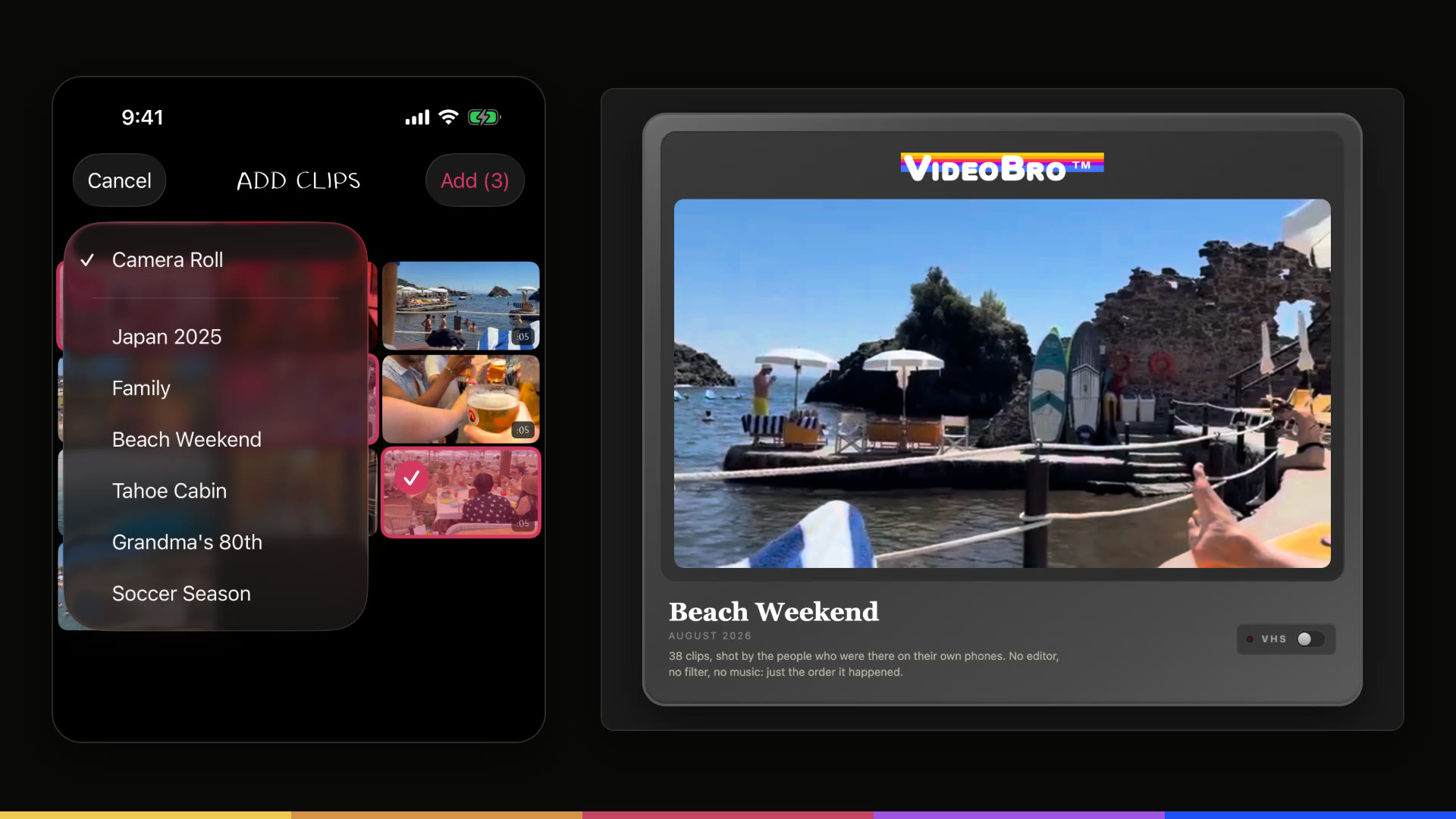
VideoBro, the free iPhone app where friends and family film one shared tape and get back a single home movie, can now add videos straight from Shared Albums in Apple's Photos app. After a trip or a birthday, a group's video is often already sitting in a shared album. Now it can go onto a VideoBro tape and become one film. VideoBro has also made that film easier to pass on: it can be shared from the web as well as the iPhone, and a shared link now arrives with a large picture from the film.
A shared album is a good place to collect everyone's clips, and it keeps them as separate clips. A VideoBro tape puts them in the order they were shot, from everyone who was there, and Develop turns the tape into one film that everyone on it keeps.
From a Shared Album to a tape
Adding video that is already on the phone has always been part of VideoBro: the + button on a tape opens Add Clips, which shows the phone's Camera Roll. Since the September 14, 2026 update, version 1.0.3, Add Clips can also show the Shared Albums the person has created or joined in Apple Photos. A small Camera Roll menu under the title switches the view to an album. Pick the videos, tap Add, and they join the tape alongside everyone else's, each taking its place by when it was recorded.
- Copies, not a connection. VideoBro adds a copy of each chosen video to the tape. It never changes the album, adds anything to it or keeps it in sync, and nothing comes from an album unless someone picks it.
- The same rules as the Camera Roll. Only horizontal videos can be added, and each tape holds up to 2 hours of footage from up to 8 people.
- The Camera Roll stays first. Add Clips still opens on the Camera Roll. The album menu appears when VideoBro has full access to Photos and at least one Shared Album could hold a horizontal video.
When a shared album is enough on its own, and when it helps to turn one into a film, is its own guide.
Sharing the finished film
Once a tape is developed, anyone who has the film in their Tape Cabinet and a VideoBro account can share it with an unlisted link. The person who opens it watches in any web browser, on any device, with no app and no account needed, and can switch on VHS mode there if they like.
- A real picture in the preview. A shared link now unfurls with a large picture made from the film's own cover, so in Messages or a group chat it looks like the film rather than a logo.
- Share from the web, too. In the Tape Cabinet on the web, each film has its own Share button: Copy link, Email, WhatsApp, Facebook, a Share button that opens the device's own share options where the browser has them, and Stop sharing.
- A clearer share on iPhone. Sharing from the Tape Cabinet in the app opens the iPhone's share sheet with the film's name and cover at the top.
- A way to the app. On an iPhone, Safari shows a banner on a shared film that opens it in VideoBro, or leads to VideoBro on the App Store for someone who doesn't have it yet.
- Nothing public. A link can be switched off at any time with Stop Sharing, and shared film pages are kept out of search engines.
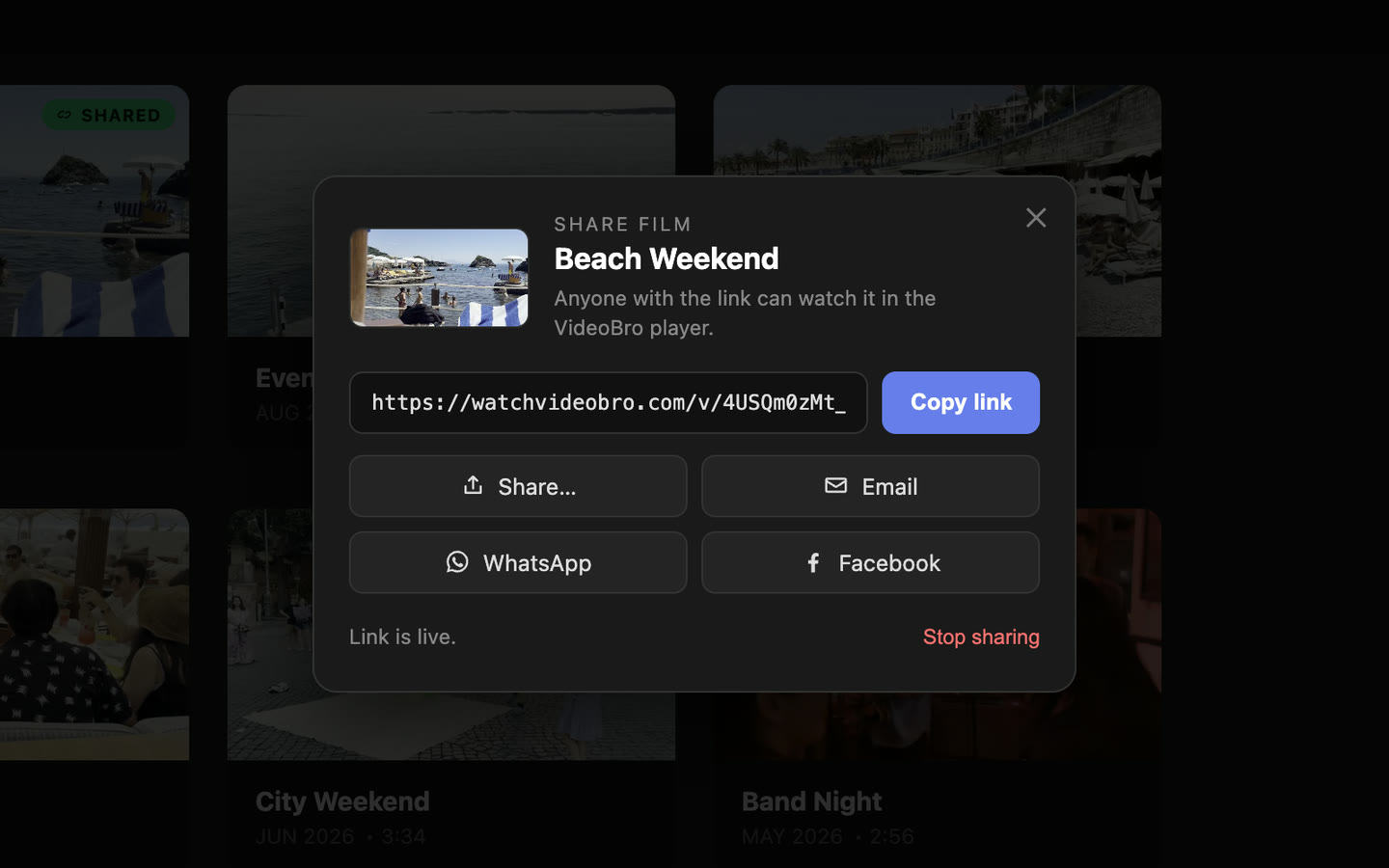
The richer share on iPhone arrived with the same September 14 update. How VideoBro keeps a shared film private is covered in its own guide.
Pricing and availability
Adding from Shared Albums is part of the VideoBro iPhone app. Films can be shared from the app and from the Tape Cabinet on the web at watchvideobro.com. VideoBro is free and includes 2 GB of storage, about an hour of footage. Each tape holds up to 2 hours of footage and up to 8 people. How VideoBro works, step by step.
VideoBro is on the App Store for iPhone, and anyone can watch a shared film in a browser. Get VideoBro on the App Store.
About VideoBro
VideoBro is an iPhone app for making home movies together. Friends and family film into one shared tape from their own phones, every clip lands in the order it was shot, and VideoBro turns the finished tape into a single film for everyone on it. VideoBro is free, and is made by brothers Doug and Drew. watchvideobro.com
Media contact
Logos, screenshots and App Store reviews are in the press kit.