VideoBro / Shared Tapes

One tape, every angle of the day.

Like passing one camcorder around all day, except nobody hands it over. Film as it happens, or add clips you already shot.

Three iPhones side by side under the VideoBro logo, each one recording: a child building a sandcastle, friends watching a sunset on the beach, a game of beach volleyball. Arrows run from all three down into a single tape labelled NEW, marked SHARED TAPE.
Three phones, one tape. Three versions of the same afternoon.

One day, as many angles as there are phones

Three people at the same dinner saw three different dinners. One was at the table, one was out on the porch, one turned around in time for the thing everybody is still talking about. The usual way a group ends up with all three is a text thread on the last night of a trip: send me your clips, I'll put something together. Some of it never gets sent. What does arrive comes in whatever format and resolution each phone happened to export, out of order, with no note on who shot which one.

A tape skips that step. You start a tape before the trip, or the party, or the season, and everyone you invite films into it from their own phone. There are two ways onto it: turn ARM on and the horizontal video you shoot lands on the tape by itself, or add video that is already sitting in your camera roll. Either way a clip slots into that one tape at the moment it was recorded, whoever shot it and whenever they got around to adding it. Developing the tape turns the lot into one film that everyone on the tape gets.

Still weighing a shared tape against a shared album, a real editor, or a highlight-reel tool that does the work for you? That comparison, and which one actually fits your group, is laid out on what kind of collaborative video app you need. This page only covers how a shared tape itself behaves.

Six phones each filming a different part of a trip: a beach, a road, a hike, a dinner, a city, a campfire. Bright ribbons flow from every phone into one VHS tape labelled Our Trip.

Getting the crew in

One link, sent however you already talk to these people.

  1. Collab, then Invite

    Tap Collab, then Invite. VideoBro hands the link to the iPhone share sheet, so it goes out through Messages, Mail, or whatever you were already going to use.

    Anyone already on the tape with an account can do this, not just the person who started it. It doesn't have to route through one person all week.

    The invite panel open over a tape called MY LA, which is resting on a view across the treetops to a distant city skyline. The panel reads Bring People In above a large QR code, a line noting the invite works for seven days, and a Send Link button.
    Send the link however you like, or let someone scan the code.
  2. They open it and they're in

    Whoever taps the link starts filming into that tape from their own phone. They'll need the app on an iPhone to do it; the link walks them there if it isn't installed yet. If they already have a VideoBro account, they're in as themselves. If they don't, they can still join: they film, add clips and watch the finished film, and that's the whole guest experience. No account, no sign-up screen to get past first.

    What a guest can't do is Develop the tape, invite anyone else, share a film, download one, or start a tape of their own. Those need a free account, which they can create any time.

8

People on a tape, including you

The same number on every plan. Hit it and Invite reads Tape Is Full: start another tape instead.

7

Days an invite link lasts

After that it stops working. Anyone on the tape with an account can send a fresh one.

0

Accounts required to join

Opening the invite is enough to start filming. An account is only needed to run the tape.

1

Person who can remove someone

The owner. Nobody else on the tape can eject a collaborator.

Two ways onto the same tape

Different phones, different moments, no coordinating required.

ARM, on every phone

Each person taps ARM on their own phone and films with the iPhone Camera app, the same as always. Every horizontal video they shoot while ARM is on lands on the shared tape automatically, uploading quietly in the background. It doesn't matter whose phone it came from; it's all one tape.

Add Clips, whenever you get to it

Nobody has to be armed at the right moment. Tap + and pick any horizontal video already on your phone, whatever day it was shot, whether that was during the trip or two weeks before it. It doesn't get tacked onto the end: it drops into the tape at the moment it was actually recorded, so something filmed on the Tuesday lands on the Tuesday.

A tape holds up to 2 hours of footage, on every plan. Past that, start another tape.

One timeline, no matter whose phone

Clips are ordered by when they were recorded, never by when they were uploaded or added. That's what holds the whole thing together: three phones and a clip someone remembered on the drive home all come out in one order, the real one. There's no drag-to-reorder, on purpose: the tape tells the evening the way the evening went.

Clips show up on everyone's phone as they land, with a push telling everyone else someone added one. It isn't a live broadcast, nobody is watching a feed refresh; it just means you don't have to ask.

Every clip knows who shot it

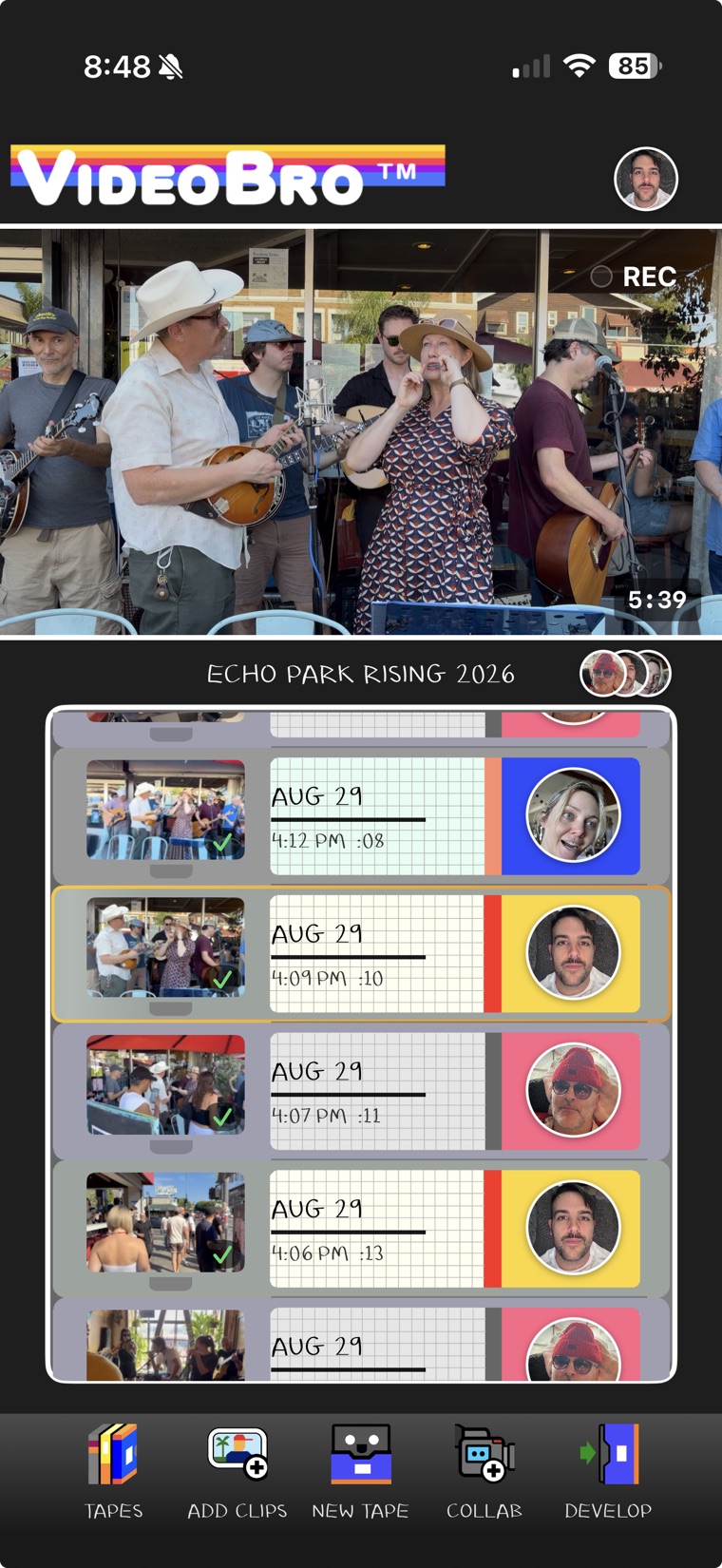
Each row on the tape carries the face of whoever filmed it, so scrolling through the tape also tells you who was holding the phone for which part of the day. Open Collab and the Collaborators list breaks it down further, a clip count next to every name.

None of that follows the footage into the finished film. Develop makes one film, in order, with no names or credits laid over it. The tape remembers who shot what; the film is just the day.

The VideoBro Active Tape screen: clip rows, each stamped with the date, the time it was shot, its length, and the face of whoever shot it.
Every clip is stamped with who shot it. It never shows up in the film itself.

Being on somebody else's tape

A shared tape has one owner, the person who started it, and everyone else is a collaborator or a guest. Most of what happens on the tape is a group effort. A few things belong to the owner alone.

The videos on your own camera roll are untouched by anything that happens here: ARM only watches for new ones, it never deletes what's already there. Clips and the tape itself are a group's to manage together, not a private stash.

  • Only the owner can Remove someone. Their clips come off the Active tape and they lose access to it. Anything already developed while they were on the tape is theirs to keep.
  • Leaving is your own choice. Tap Leave Tape and pick Leave & Keep My Clips or Leave & Remove My Clips. Owners can't leave their own tape; they'd delete it instead.
  • Anyone with an account can Develop. Not only the owner. Everyone on the tape at that moment gets the finished film in their own Tape Cabinet.
  • Only the owner can use Continue Editing. For 30 days after a film is developed, the owner can reopen the tape to keep adding to it. While it's open, the film comes out of everyone's Cabinet until the owner develops again, with no undo.
  • The owner's 2 GB carries the whole tape. Every clip anyone adds counts against the owner's storage. Joining someone else's tape costs you nothing on your own shelf.

After it's developed

Once the tape is developed, the film sits in the Tape Cabinet of everyone who was on the tape at that moment, ready to watch and, if you have an account, to sort onto a shelf or share. Sharing a film hands out one unlisted link; whoever gets it watches in a browser, on any device, with no app and no account. The owner can still reopen the tape for 30 days with Continue Editing, which pulls the film back out of everyone's Cabinet until it's developed again. See the full picture on Develop and the Tape Cabinet.

Not sure how much of your 2 GB a shared tape will use? It's all covered on the storage page, including what happens if the owner's shelf fills up mid-trip.

The one behind the camera

Every family has one. Somebody shot all of it, and everyone else could name them without thinking about it. They are everywhere in the footage and nowhere in it: their voice is on nearly every clip, their hand comes into frame to move a glass out of the shot, but they appear on screen almost never, and only by accident.

A shared tape changes that without asking anyone to remember to swap. With three or four phones filming the same afternoon, the person who usually holds the camera spends most of it in front of somebody else's, caught by whoever else was there. It's just what happens once more than one phone is pointed at the same day.

Questions people ask first

What happens if the tape owner runs out of storage mid-trip?

Nothing on the tape is touched. New clips are blocked until the owner makes room, so it never overflows silently. Collaborators see a message that the tape's owner is out of room. The storage page walks through exactly what counts against the 2 GB.

Do the people I invite need the app, or an account?

The app, yes, because filming into a tape takes an iPhone. An account, no, not to join: opening your invite link is enough to start filming, add clips and watch the finished film. They'll need a free account of their own the day they want to Develop, invite someone else, or share a film.

Do we all have to be filming at the same time?

No. Film the same moment from three angles, film different parts of the day, or add video you already shot with Add Clips, any horizontal clip on your phone, any date. Every clip lands at the time it was recorded rather than at the end, so somebody who joins on day three can add day one and it sits on day one. The only thing a latecomer misses is a film that was already developed before they joined.

Can I invite people who don't have iPhones?

Filming into a tape takes an iPhone, since that's the only place ARM and Add Clips exist. Once a film is developed, though, anyone can watch it on any phone, tablet, or computer, no app and no account needed, if someone on the tape shares the link with them.

Does filming into a shared tape work offline?

Yes. Clips save to the phone the moment they're shot and upload on their own in the background when a connection comes back, even with the app closed. Nobody has to stand around waiting for a bar to fill before they can keep filming.

Who pays for the storage on a shared tape?

Whoever started the tape. Every clip anyone adds to your tape counts against your 2 GB, and joining someone else's tape uses none of yours. The finished film sits on the owner's shelf; the rest of the crew watch it for free.

Start with 2 GB free.

The free plan is the real product, not a demo: make tapes, fill one with up to 8 people including you, trim, Develop, and share films by link. Storage is the only thing a paid plan will ever change.

Free on iPhone. No trial, no card. Anyone can watch a finished film in a browser. On a computer? Get it on your iPhone.